


How We Built a Configurable Challenge Platform That Adapts to Every Fitness Journey


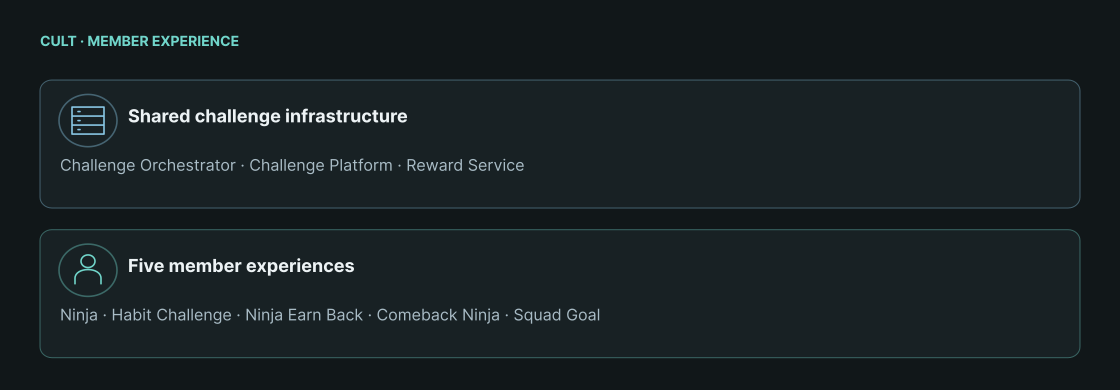
No two fitness journeys look the same. At cult, we use challenges to meet members at different stages of their fitness journey.
cult Ninja helps new members build consistency, while Habit Challenge adds a higher-stakes commitment. Ninja Earn Back lets members recover lost membership days, and Comeback Ninja encourages inactive members to return. Squad Goal brings members together around a shared workout target.
The engineering challenge? Powering all these journeys without building a separate flow for each.
One Challenge System Had to Serve Different Member Moments
Each challenge came with its own set of conditions. Some gave members a longer window to complete their goal. Others changed the stakes or the way members earned their reward.
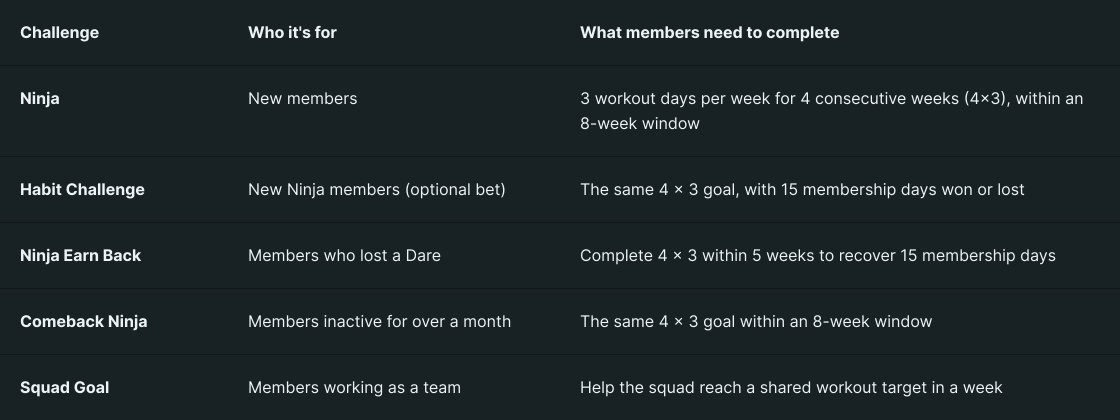
The audience, time window, activity goal, or reward could change with each challenge.
Could we reuse user activity tracking and define these variations through configuration instead of building a separate flow for each one?
Separating Who Can Join From What They Need to Complete
A challenge needs to answer two questions: who can join, and what do they need to do? Combining both into one fixed set of rules would make each variation harder to manage. So we split them into two configurations.
The Enrollment config determines who is eligible. It stores the eligibility conditions, rule priority, enrollment dates, and how long each member's enrollment lasts.
The Challenge config defines what members need to complete. It specifies the metric to be tracked, such as the number of active workout days in a week, along with weekly targets, challenge dates and duration, milestone conditions, and rewards. A metric is the measure used to track a member's progress towards a challenge goal.
This separation lets us change either set of rules independently. The same workout goal can serve a different audience by changing the Enrollment config. The goal or reward can also change without affecting eligibility.
Each configuration has its own service. The Challenge Orchestrator evaluates enrollment rules, while the Challenge Platform manages the challenge.
But how does a member move from being eligible to making progress? That's where the two services come together.
Challenge Orchestrator Gets Members In, And The Platform Takes It Forward
With the two configurations in place, the next step is to get members into a challenge. The Challenge Orchestrator reads the Enrollment config and checks whether a member meets its conditions.
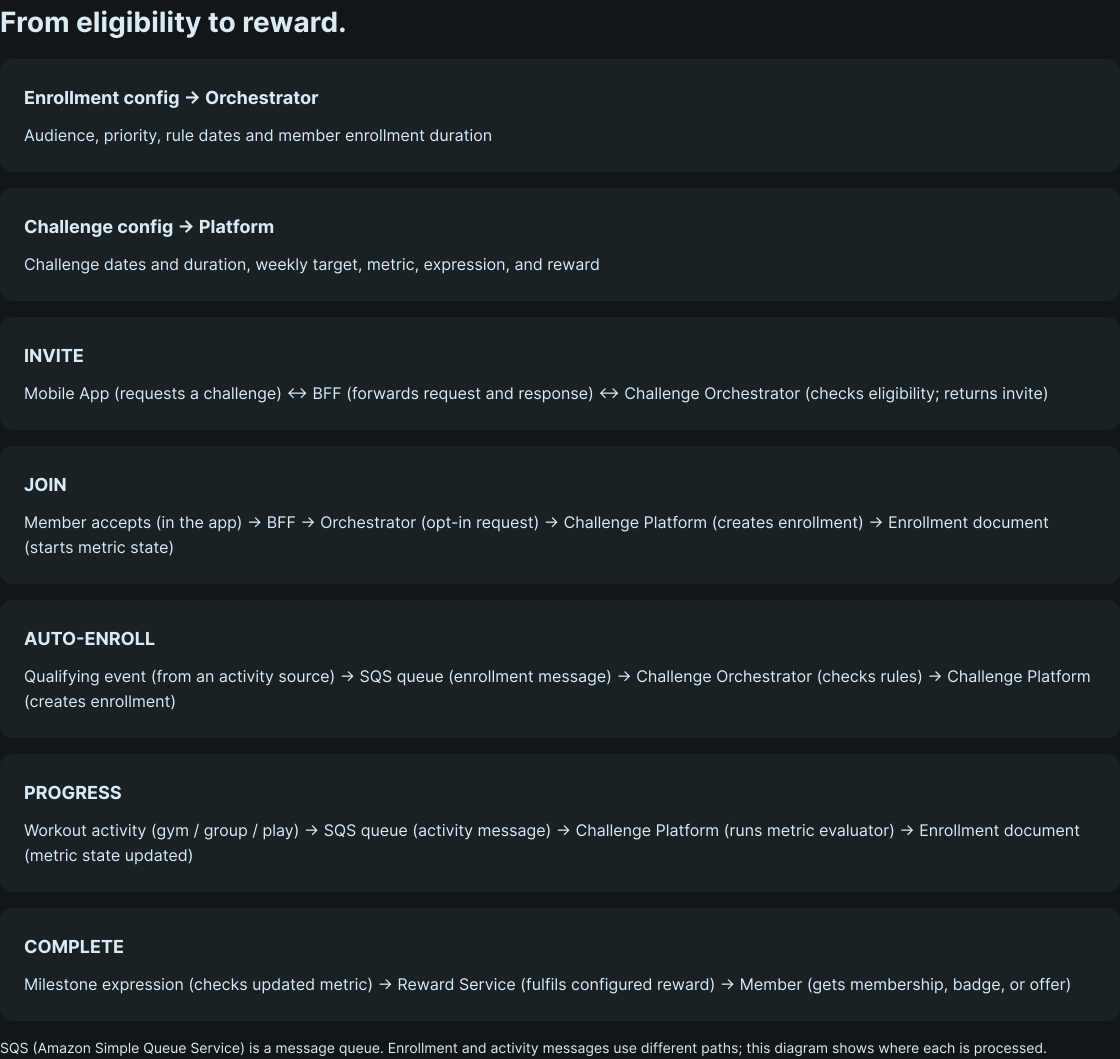
There are two ways to enroll:
Invitation-based: The Mobile App sends a request to the BFF (Backend for Frontend), a backend layer that handles communication between the app and the services supporting it. The BFF forwards the request to the Orchestrator, which checks the member's eligibility and returns an invitation for them to accept.
Automatic: A qualifying activity event enters an SQS (Amazon Simple Queue Service) queue. SQS is a messaging service that temporarily holds messages until a service is ready to process them. The Orchestrator retrieves the message and checks the member's eligibility.
Once a member joins, the Challenge Platform creates an enrollment document containing their enrollment dates, status, and progress. It then takes over challenge tracking.
The Orchestrator decides who gets in; the Platform manages what happens next.
Workout activity follows a separate SQS queue, giving the Platform a dedicated path to evaluate member progress.
So, how does the system turn individual workouts into measurable progress?
Following One Member Through The Habit Challenge
Consider a new member who has joined Ninja and decides to take up the Habit Challenge. They see a four-week commitment with 15 membership days to win or lose. Behind that choice, two configurations determine how the challenge works.
Step 1: Decide who can enter
The Enrollment config defines the conditions a member needs to meet to join a challenge. The Habit Challenge configuration checks whether a member belongs to experiment treatment group 2042 and the new-members segment. Both conditions need to be met for the member to qualify.
{
  "challengeId": "ninja-dare",
  "startDate": "2026-04-20",
  "endDate": "2026-12-31",
  "durationDays": 28,
  "priority": 200,
  "conditions": [
    {
      "type": "USER_IN_EXPERIMENT_TREATMENT",
      "experimentId": "2042"
    },
    {
      "type": "USER_IN_SEGMENT",
      "segmentName": "new-members"
    }
  ]
}
The enrollment rule runs from April 20 to December 31, 2026. Its durationDays value of 28 sets the member's personal enrollment window. The member's start and end dates are saved in an enrollment document, an individual record that stores their challenge enrollment details, status, and progress.
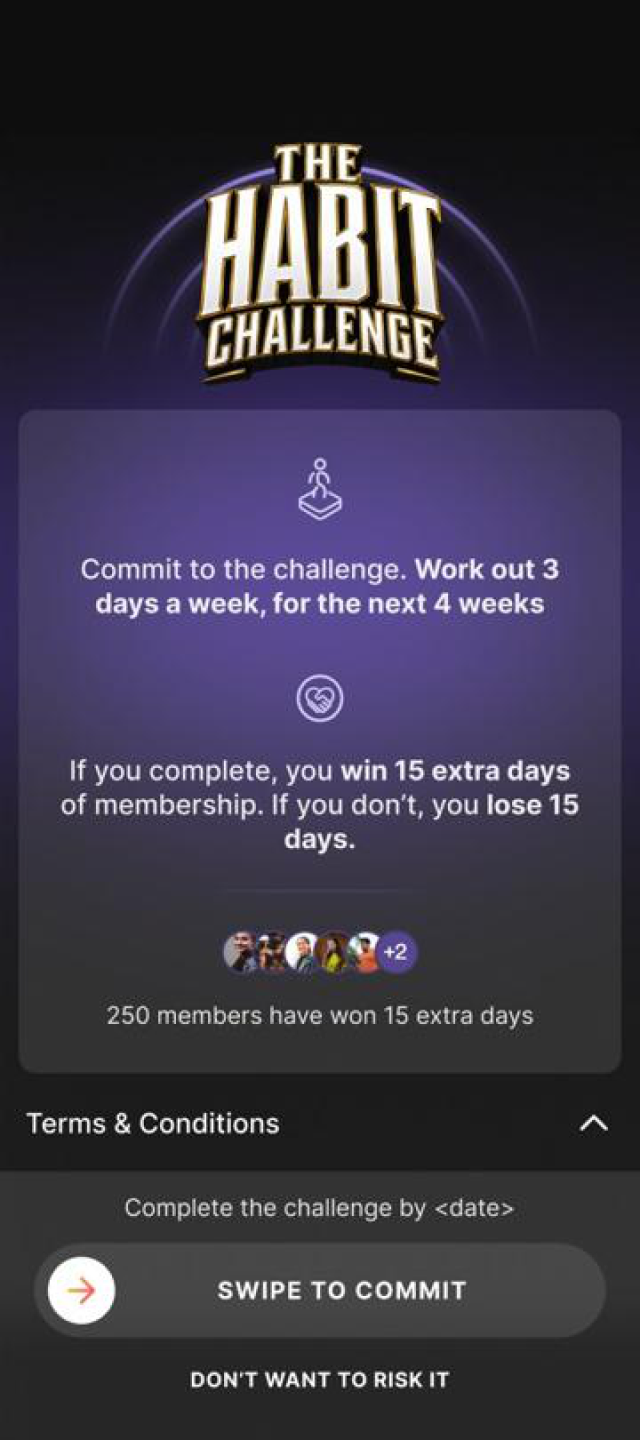
Accepting creates an enrollment record for this member. That record is where the Challenge Platform keeps the member’s current metric state.
Step 2: Define what counts as success
The Challenge config uses the weeklyActiveDays metric to count distinct days with a gym workout, group class, or play session. The target is three active days per week.
Challenge Config
{
  "challengeId": "ninja-dare",
  "title": "Habit Challenge",
  "startDate": "2026-04-20",
  "endDate": "2026-12-31",
  "metric": {
    "name": "weeklyActiveDays",
    "activities": [
      "GYM",
      "GROUP_CLASS",
      "PLAY"
    ],
    "weeklyTargetDays": 3
  },
  "milestones": [
    {
      "when": "day(weeklyActiveDays) >= 3 AND week(weeklyActiveDays) >= 4",
      "reward": {
        "type": "membership",
        "days": 15
      }
    }
  ]
}
A milestone checks whether the metric meets the completion rule. Here, it looks for three active days in each of four consecutive weeks.
The two date windows answer different questions: enrollment config dates say when this audience rule can run; challenge config dates say when the challenge is active. For this flow, the enrollment duration computes the member’s end date, which is passed to the Platform with the start date. The Platform also has a challenge-level duration setting, used when an enrollment arrives without an explicit end date; it does not independently set this member’s window here.
Step 3: Turn workouts into progress
After the member accepts, the Platform creates an enrollment document. Each qualifying workout generates an activity message, which enters the SQS queue. The Platform processes the message using the code-backed evaluator for the configured metric and saves the updated progress.
Two workouts on the same day count as one active day.
Week 1: 3 workout days — goal met
Week 2: 3 workout days — goal met
Week 3: 3 workout days — goal met
Week 4: 3 workout days — milestone
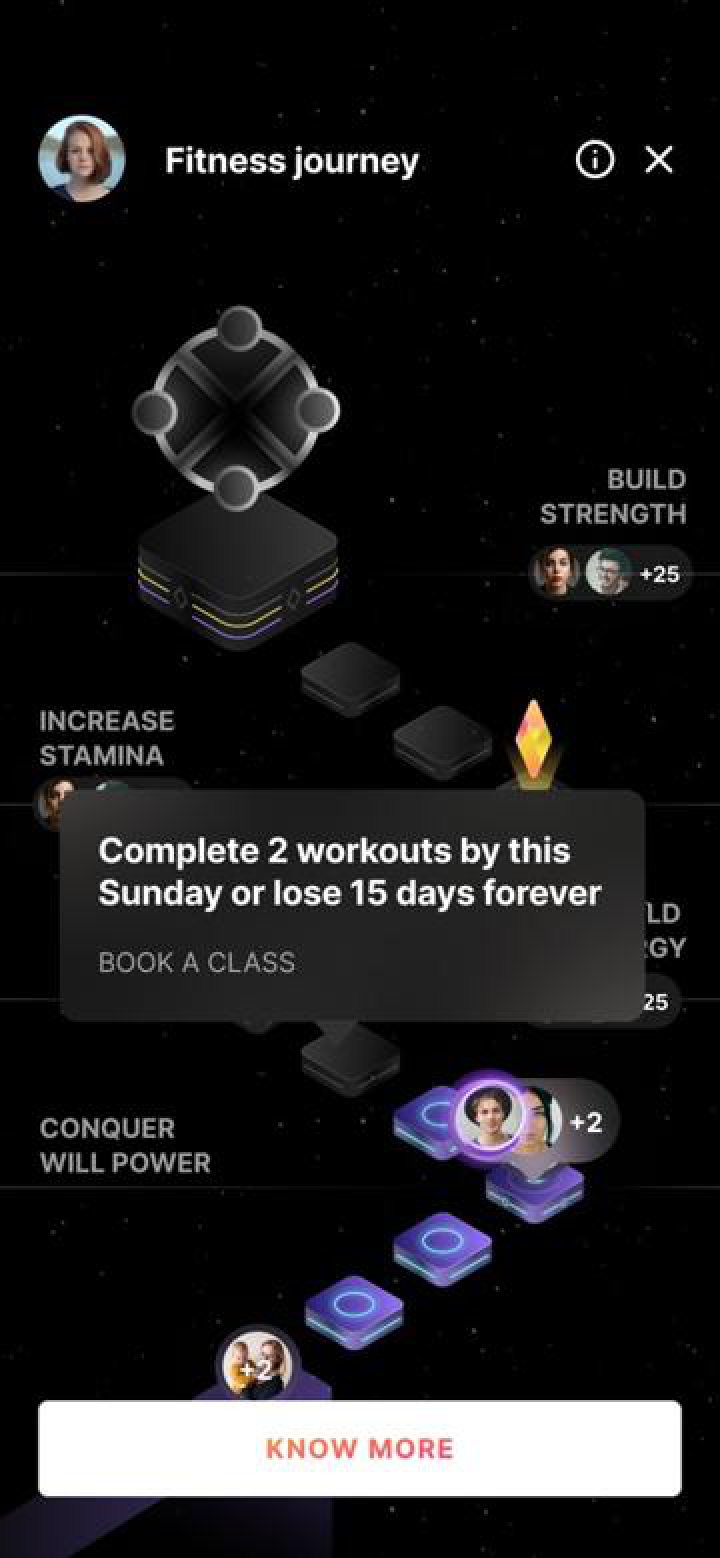
The member sees their journey and next goal
Step 4: Evaluate the milestone and grant the reward
When the member meets the four-week condition, the milestone expression evaluates to true. The Platform sends the configured reward to Reward Service, which fulfils the reward. For the Habit Challenge, this means adding 15 membership days to the member's account. Other challenges can offer rewards such as badges or offers.
After week four, the milestone expression is true. The Challenge Platform marks it achieved and sends its configured reward to Reward Service.
Milestone met: 4 weeks × 3 days → Reward Service: grants membership days
15 days selected in config
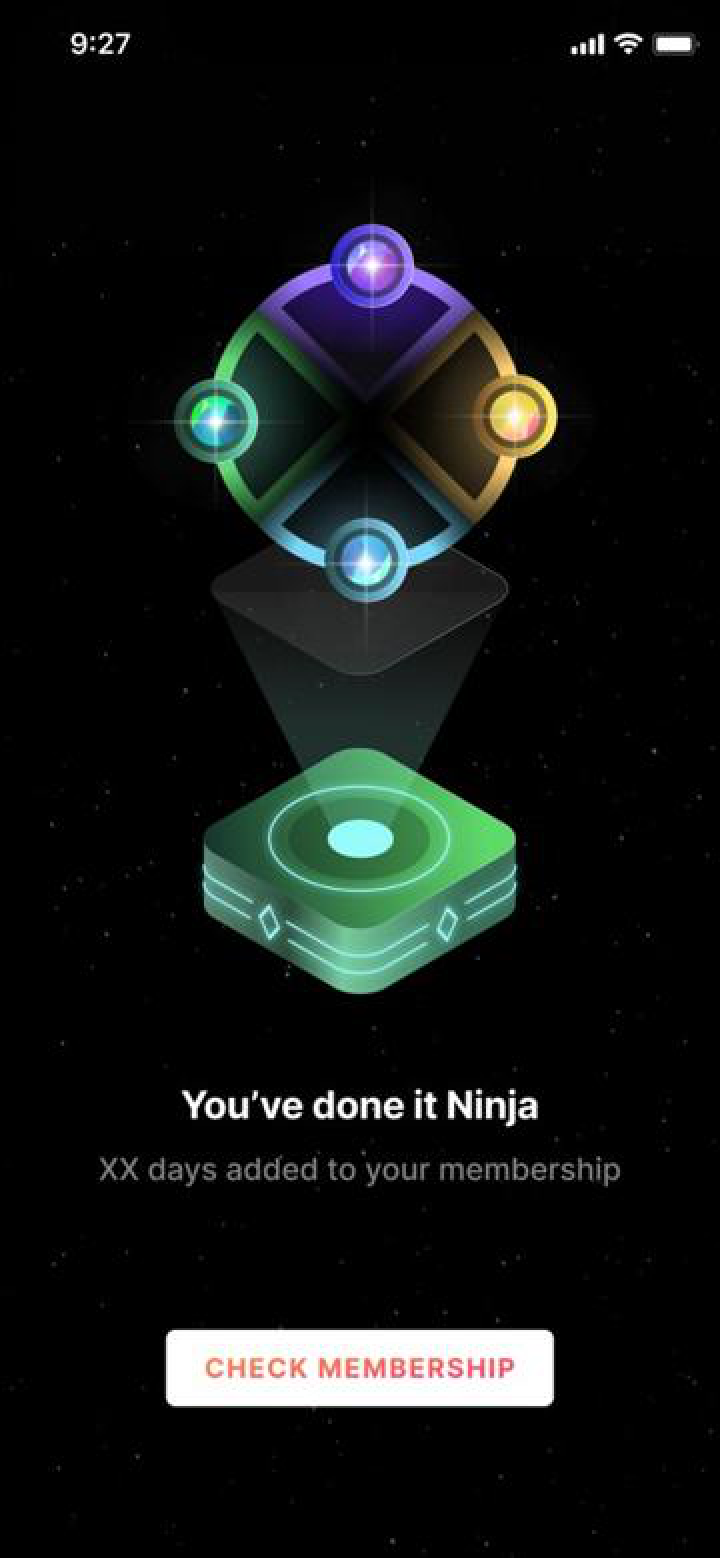
Completion: reward added to the member’s account
The same milestone can select a different reward—such as an offer or badge. The config chooses the type and value; Reward Service fulfils it.
The same process can support another audience or goal. What changes when a new challenge is introduced?
One Architecture, Different Challenge Journeys
We'd followed one member through the Habit Challenge. But could the same building blocks support a different journey?
They could, because each challenge changes through configuration, not new code. For example, Comeback Ninja targets members inactive for over a month by changing the Enrollment config.
The completion window can also change. Habit Challenge gives each member 28 days, while Comeback Ninja allows eight weeks for the same 4 × 3 goal.
Changing the metric tracked or milestone expression changes the goal. The reward can also shift from membership days to an offer or badge. Throughout, the Orchestrator handles eligibility, while the Platform tracks activities, evaluates milestones, and triggers rewards.
A new challenge can follow a different journey without needing a new engineering flow.
What Building Challenges This Way Makes Possible
Building challenges this way gives us three advantages.
Separating Enrollment and Challenge configs lets us change eligibility without affecting the goal. Sharing the Orchestrator, Platform, and Reward Service reduces duplication by giving every challenge the same underlying infrastructure.
A configuration-driven approach also lets us experiment with different audiences, targets, durations, and rewards without building new flows.
For members, this means challenges can reflect different fitness goals and stages of their journey. For engineering, it means supporting these experiences without creating a separate system for each one.
Shaping this configurable challenge system was a collaborative effort. It wouldn't have been possible without the Member Experience Team at cult.fit, whose contributions helped bring the initiative to life.
More from
Engineering
category


